Dear Our Customer,
Be Reminded we are having change on our Sage Accpac product below are the change:
Sage ERP Accpac is Now Sage 300
Sage ERP Accpac 100 is Now Sage 300 Standard ERP
Sage ERP Accpac 200 is Now Sage 300 Advanced ERP
Sage ERP Accpac 500 is Now Sage 300 Premium ERP
We will be using this name starting on the release of Sage 300 ERP 2012.
Showing posts with label Accpac Indonesia. Show all posts
Showing posts with label Accpac Indonesia. Show all posts
Friday, 15 February 2013

Year End Closing
Customers,
In Accpac Year End processing consist of 2 part which is Mandatory and Optional. For those optional one mostly is resetting batch no, clearing history, clearing posting journal. But For the mandatory One If you have not processed it , it will Stop your transaction for upcoming Year . So Here are 2 process which is mandatory in the Year End Closing :
1. General Ledger
Create New Year function is to close all your income statement account against Retained Earning and create opening balance for the upcoming Years. This process is done Automatically in the system. The Menu Can Be Found Under :
Fixed asset Also Required a Year End Processing to create the new Fiscal Year. Without this you won't be able to record New Acquisition or other transactions. The menu can be found under:
In Accpac Year End processing consist of 2 part which is Mandatory and Optional. For those optional one mostly is resetting batch no, clearing history, clearing posting journal. But For the mandatory One If you have not processed it , it will Stop your transaction for upcoming Year . So Here are 2 process which is mandatory in the Year End Closing :
1. General Ledger
Create New Year function is to close all your income statement account against Retained Earning and create opening balance for the upcoming Years. This process is done Automatically in the system. The Menu Can Be Found Under :
- G/L Periodic Processing
- Create New Year
Fixed asset Also Required a Year End Processing to create the new Fiscal Year. Without this you won't be able to record New Acquisition or other transactions. The menu can be found under:
- A/M Periodic Processing
- Year End Processing
Wednesday, 26 May 2010
Ops Inquiry 56
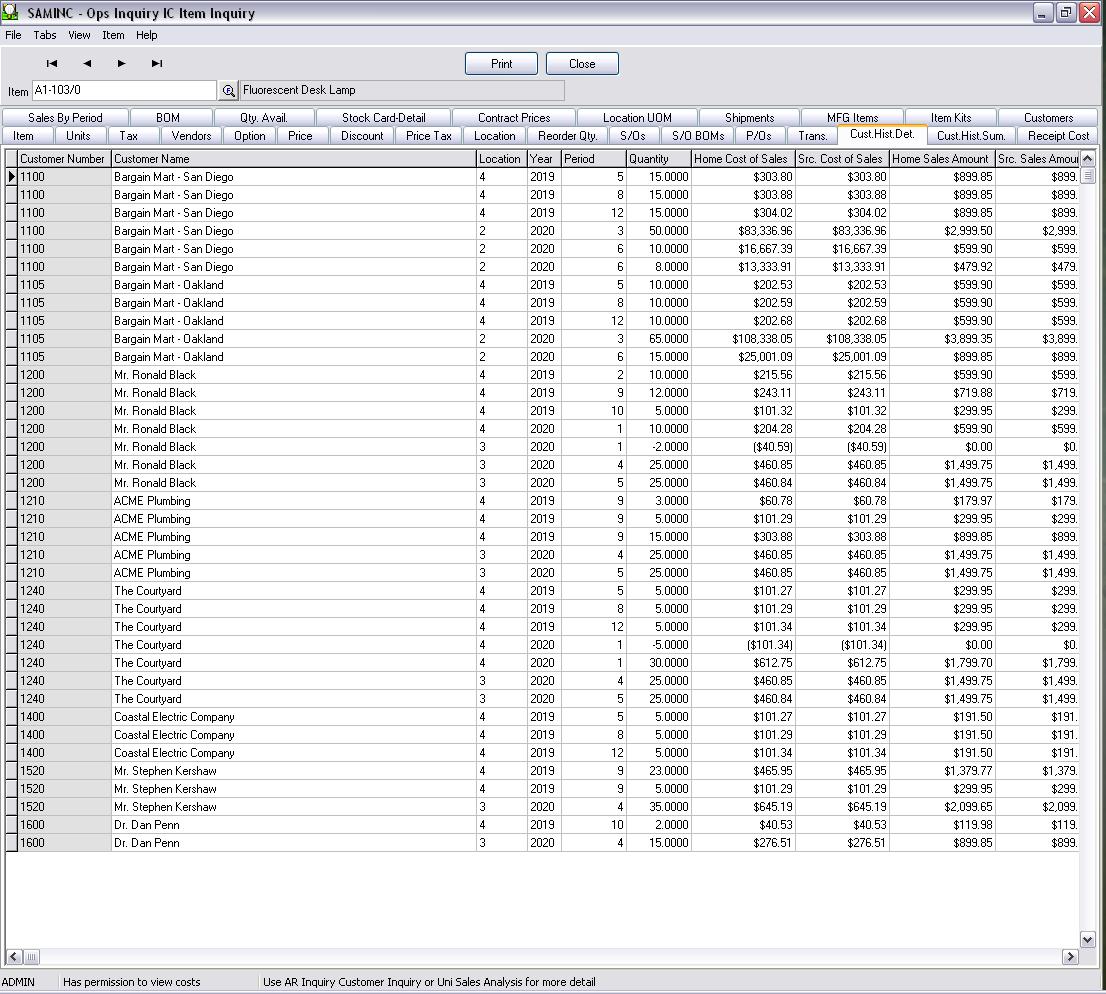
With the release of 56. Ops inquiry is now part of Accpac, which means another FREE module has been incorporated into core accpac. Ops inquiry give you the ability to check and view all information regarding an item starting from first it was created, received and shipped out. All into 1 single screen. It also give the ability to preview sales or purchase information
Below are some screen shot from the ops inquiry module :


Below are some screen shot from the ops inquiry module :


Tuesday, 6 April 2010
What Windows Operating Systems Are Supported For Pervasive.SQL 10.2 and 10.3?
For the Pervasive.SQL 'Server' for Windows edition, X64(64bit) and X86(32bit) platforms are available. Both platforms have been tested and are supported with the following Windows operating Systems:
Windows Vista (Requires SP1 for v10)
- Enterprise x86 and x64 Editions
- Ultimate x86 and x64 Editions
- Business x86 and x64 Editions
Windows 7
- Professional
- Ultimate
- Enterprise
Windows Server 2003
- R2 Server x64 Edition
- R2 Server and Small Business Server
- R2 Server, Small Business Server, and Failover Cluster
- R2 Server Terminal Services
- Server x64 Edition (SP 2)
- Server and Small Business Server (SP 2)
- Server, Small Business Server (SP 2), and Failover Cluster
- Server Terminal Services (SP 2)
Windows Server 2008
- Web Server x86 and x64 Editions
- Datacenter x86 and x64 Editions
- Enterprise x86 and x64 Editions
- Standard x86 and x64 Editions
Windows Small Business Server 2008
- Standard and Premium Editions x64
For the Pervasive.SQL 'Workgroup' for Windows edition, this platform is only available in X86(32bit). This edition has been tested and is supported with the following Windows operating systems:
Windows XP
- Professional 64-bit Edition (SP 2)
- Professional and Home Edition (SP3)
- Window XP Embedded (SP1), and Embedded for Point of Service
Windows Vista (Requires SP1 for v10)
- Enterprise x86 and x64 Editions
- Ultimate x86 and x64 Editions
- Business x86 and x64 Editions
- Home Premium x86 and x64 Editions
- Home Basic x86 and x64 Editions
Windows 7
- Home Premium
- Professional
- Ultimate
- Enterprise
Windows Server 2003
- R2 Server x64 Edition
- R2 Server and Small Business Server
- R2 Server Terminal Services
- Server x64 Edition (SP 2)
- Server and Small Business Server (SP 2)
Windows Server 2008
- Web Server x86 and x64 Editions
- Datacenter x86 and x64 Editions
- Enterprise x86 and x64 Editions
- Standard x86 and x64 Editions
Windows Small Business Server 2008
- Standard and Premium Editions x64
Subscribe to:
Posts (Atom)